Png to STL: Compare AI 3D Generators By Features, Price, and Output
For png to stl work, learn how to compare AI 3D generators by features, prices, file formats, print readiness, textures, rigging, and output quality.
If you are exploring png to stl, this guide helps you compare AI 3D generators for printable figurines, game assets, and other outputs by the features that matter.
AI 3D generators often look alike until you compare the input they accept, the file they deliver, and the work left afterward. This practical checklist focuses on evidence you can verify: dated prices, documented exports, useful print tools, and limits that affect the project.
The short version
- Begin with the finished job: a printable figurine, game asset, textured render, or dimensioned part.
- Compare the same image, settings, and output goal across tools.
- Separate geometry, textures, file formats, print preparation, rigging, animation, and API access.
- Check the annual bill, cost per model, free-tier license, download rules, and dated feature information.
Start with the job, not the generator
The first mistake in an AI 3D comparison is assuming every service solves the same problem. A decorative figurine needs a convincing silhouette and a closed mesh. A game character may need textures, rigging, animation, and a format accepted by the game engine. A bracket or enclosure needs dimensions and tolerances that image-to-3D mesh generation does not know.
I write the desired result in one sentence before comparing tools:
“I need a printable single-color figurine from a photo.”
Or:
“I need a textured asset for a game scene.”
That sentence tells me which features deserve attention. For printing, watertight geometry and STL or 3MF matter more than animation. For a game pipeline, GLB, materials, animation, and API access may matter more than a stand base.
The Compare page is a useful starting point because it separates competitor head-to-heads, model-versus-model tests, and best-of lists. That makes it easier to distinguish a hosted, ready-to-use workflow from a self-hosted model that requires your own hardware and setup.
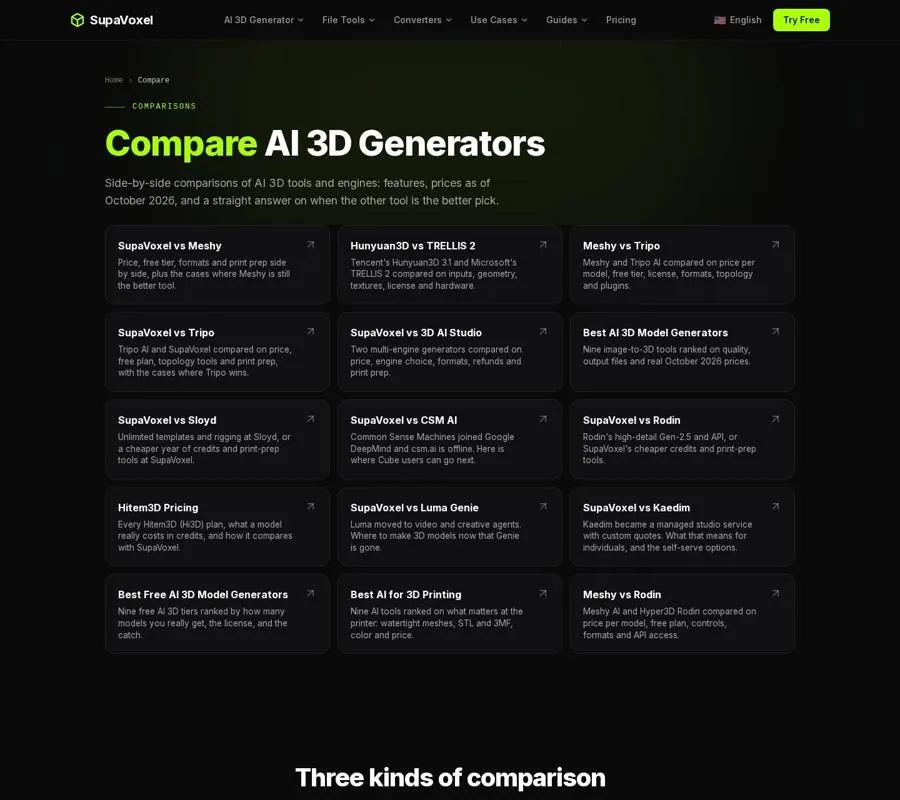
The Compare page separates head-to-head reviews, model comparisons, and ranked tool lists.
Compare inputs, geometry, and texture
Input quality affects the result as much as the generator. A single photograph does not show the back, so the service has to infer hidden surfaces. Before comparing output quality, record what each tool actually receives.
Use the same questions for every candidate:
- Does it accept one image? This is the basic image-to-3D workflow.
- Can it use extra angles? SupaVoxel's image-to-3D studio accepts up to 4 additional views, giving the model more information about sides and rear surfaces.
- Does it support text, images, or both? Do not assume an image model also accepts text prompts.
- Can it process an existing mesh? Texturing an uploaded model is different from generating a new one.
- What image conditions are recommended? One subject, a clear background, and a three-quarter view usually provide more useful shape information than a crowded scene.
Keep the picture, crop, subject, and requested result constant. If one service receives several angles and another gets one image, you are not comparing the generators fairly. I also avoid judging a tool from one polished vendor sample; a difficult picture from your own collection is more informative.
Next, separate geometry-only output from textured output. Geometry is enough for a single-color print, because an STL contains shape rather than image texture. It is also suitable for a prototype that will receive materials later. Textures matter for games, AR, renders, and color-print workflows, but a texture is not automatically the same thing as separate filament regions.
On SupaVoxel, geometry-only generation uses 1 credit and is usually ready in under a minute. Textured generation uses 3 credits and typically takes 3 to 5 minutes. For a cost comparison, that distinction matters: paying for texture makes little sense if the final object will be printed in one filament.
The image-to-3D rankings are useful for this part of the comparison because they put geometry, texture, pricing, free limits, and output formats in the same review rather than judging only the preview render.

The image-to-3D ranking compares model quality categories, costs, limits, and downstream preparation.
Check the export and the next tool
A file format matters because it determines what you can do after generation.
- STL suits single-color printing. It stores triangles, not textures, and has no built-in units, so check the imported height in millimeters before slicing.
- 3MF is useful for color, multiple objects, and print-project information. On paid plans, SupaVoxel can create a 3MF divided into either 4 or 16 filament colors for Bambu AMS workflows.
- GLB carries geometry and materials in a convenient package. SupaVoxel's free allowance provides GLB downloads, and a browser converter can turn a GLB into STL for a single-color print.
- OBJ can be useful when a workflow keeps geometry and texture files separate, but check whether all companion files are included.
- USDZ belongs in the comparison only when the plan explicitly offers it and your next application needs it.
The useful question is not “How many formats are listed?” It is “Does the plan I can afford provide the format my slicer, game engine, or editor accepts?” A free GLB is valuable, but it is not equivalent to a paid STL or a color-ready 3MF.
Check print preparation and production features
A model can look closed in a viewer and still fail in a slicer. AI systems reconstruct surfaces rather than designing a solid from measured dimensions. Common problems include holes, reversed normals, floating fragments, intersecting shells, and walls too thin to print.
For a print-focused comparison, record these as separate features:
- Watertight or manifold repair
- STL export
- Color-separated 3MF
- A flat stand or base
- Plane cuts
- Alignment pins or connectors
- Mold generation
- Credit cost for every preparation step
A watertight mesh has no open gaps, and each edge belongs to exactly two faces. Thin parts also need attention: on a 0.4 mm nozzle, about 0.8 mm is a practical minimum for many visible walls. Fingers, antennae, sword edges, and tails can disappear when they are thinner.
For paid plans beginning at $25 per year, SupaVoxel includes repair, bases, pin-guided cuts, mold creation, and the four- or sixteen-color print export in the same plan. These preparation actions do not take additional credits. That is different from services that charge separately for repair, splitting, or color preparation.
Production features should remain separate from generation features:
- Rigging prepares a character for posing.
- Animation may provide motions or animation support.
- An API matters for automation and batch workflows.
- Mesh texturing is not the same as making a new model from a picture.
A print tool can be the wrong choice for a game pipeline, and a character generator can be a poor choice for a model you want to slice immediately. Score only the features the project actually needs.
Compare dated prices, not teaser prices
Prices change, and a discounted first month can make a subscription look cheaper than it is. I write down the date beside every price and calculate the normal cost for a full year.
A useful price checklist includes:
- Entry paid plan
- Twelve-month bill
- Regular monthly price after an introductory offer
- Included credits
- Cost per geometry-only model
- Cost per textured model
- Export formats on that plan
- Extra credits for repair, splitting, or color work
- Commercial license terms
For the October and November 2026 snapshot in SupaVoxel's rankings, Hobbyist costs $25 per year and includes 400 credits. That works out to roughly $0.06 for an untextured result and $0.19 for a textured one. The next-cheapest yearly plans listed there cost $84, while several alternatives fall around $167 to $288 per year.
These figures answer different questions. A large plan may have a low per-model price but a high annual commitment. A cheap first month may be followed by a much higher recurring bill. If a price or feature cannot be verified, I leave it out instead of guessing.
Audit the free tier separately
“Free” can mean a downloadable model, a preview, a public asset, an attribution requirement, or no usable export at all. Treat the free plan as a separate product.
Ask:
- How many credits are included?
- Do they reset or expire?
- Can you download the result?
- Which file format is available?
- Is the model public?
- Is commercial use allowed?
- Is attribution required?
- Can browser tools run without an account?
SupaVoxel provides 3 free credits with GLB downloads. Its browser tools require no sign-up and have no daily cap. Other services may provide more generations but restrict downloads, publishing, commercial use, or the license attached to the result.
The free-generator ranking is the better reference when the question is what a free account lets you keep. It compares downloads, licenses, resets, and the first paid upgrade rather than treating the largest credit allowance as the winner.
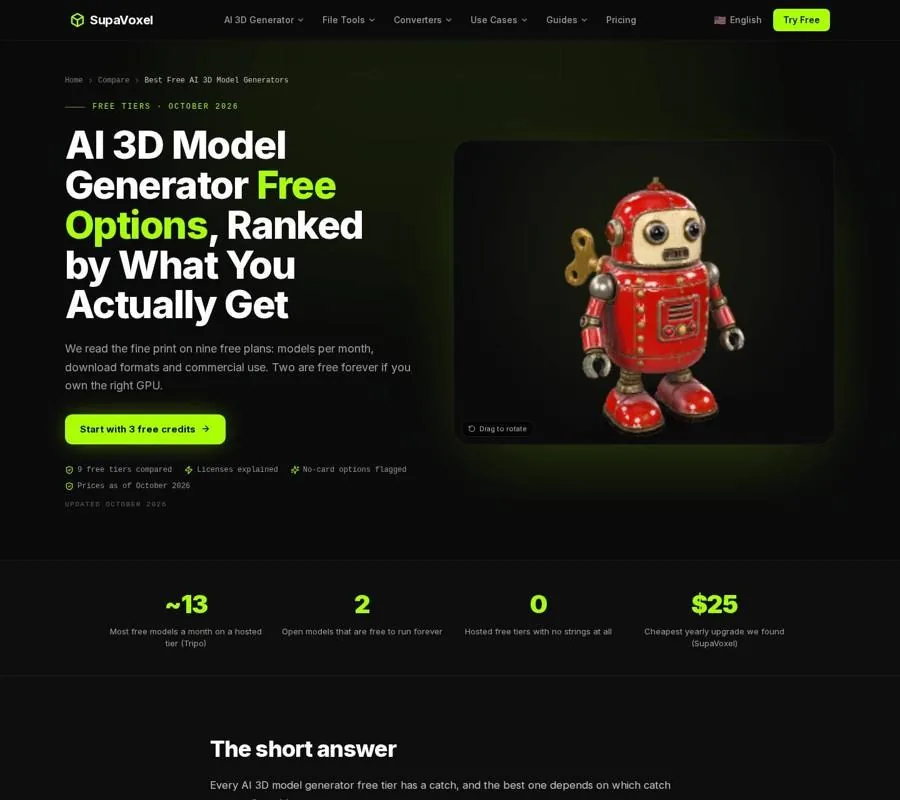
The free-tier ranking compares usable downloads, licensing conditions, limits, and upgrade costs.
Make a scorecard for the actual project
I finish with a short scorecard instead of naming one universal winner:
- Input fit — Does it accept the image, angles, text, or mesh you have?
- Output fit — Do you need geometry, texture, color regions, or animation?
- Workflow fit — Does the file open in your slicer, engine, or editor?
- Preparation fit — Are repair, bases, cuts, and color tools included?
- Business fit — Does the license cover the intended use?
- Cost fit — What is the annual bill and approximate cost per required model?
- Evidence quality — Which claims are documented, dated, or only advertised?
For a print project, the AI printing ranking is the final check because it concentrates on watertight meshes, STL and 3MF exports, preparation costs, and slicer-ready results.
FAQ
Should price or output quality come first?
Output requirements come first. A cheap tool that lacks the format, license, or preparation feature you need is not a practical bargain. Confirm the workflow, then compare annual cost and per-model cost.
How should I handle advertised generation speeds?
Label them as claims unless the comparison provides independent evidence. Keep documented prices and features separate from vendor-reported timing.
Is the tool with the most features always best?
No. Choose the smallest feature set that completes the job. A print workflow may need repair and 3MF but no animation; a game workflow may need rigging, textures, and API access.
Want to try it yourself?
Try Supavoxel →